Wednesday, 30 October 2024

Create object Using Abstract and Interface and its difference

Interface Class

interface InterfaceA

{

    string MethodA(string s);

}

Abstract Class

public class AbstractB:InterfaceA

{

    public string MethodA(string s)

    {

        return s;

    }

}


Object Creation Using Abstract 

AbstractB abstractB = new AbstractB();

abstractB.MethodA("Abstract object");

Output : Abstract object

Object Creation Using Interface 

InterfaceA interfaceA = new AbstractB();

interfaceA.MethodA("Interface object");

Output : Interface object

Note (Object Creation Using Interface) :


 Inheriting the interface directly in the Class and creating the object


 public class DerivedClass :InterfaceA
 {
     public string MethodA(string s)
     {
         return s;
     }
 }

InterfaceA interfaceA1 = new DerivedClass();
interfaceA1.MethodA("Derived object");

Output : Derived object

Sunday, 13 October 2024

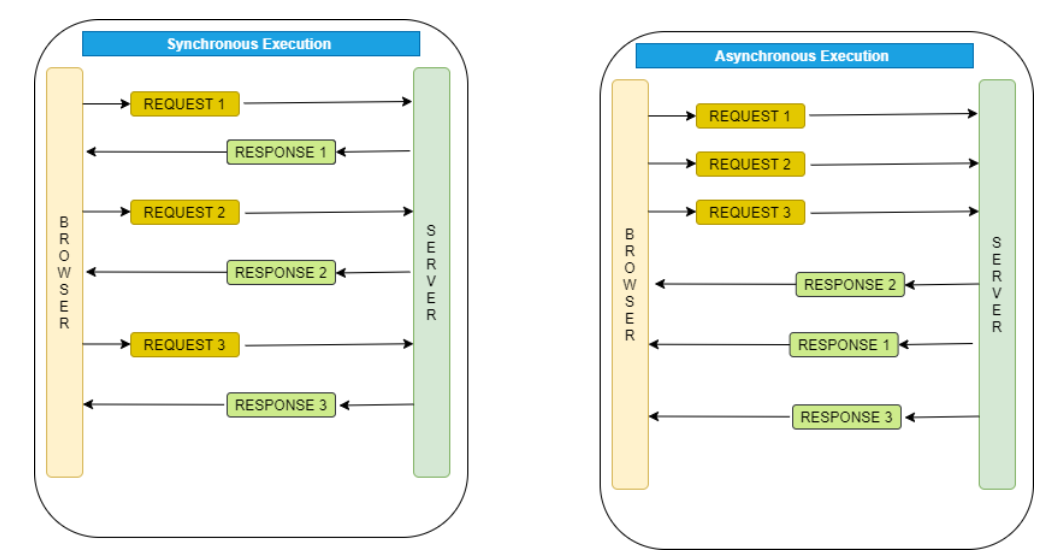
Sync and Async


If we use Async and await then its going to work in the normal way.

Sunday, 6 October 2024

React props Vs State


PROPS

STATE

The Data is passed from one component to another.

The Data is passed within the component only.

It is Immutable (cannot be modified).

It is Mutable ( can be modified).

Props can be used with state and functional components.

The state can be used only with the state components/class component (Before 16.0).

Props are read-only.

The state is both read and write.

React Pure components

We use the shouldComponentUpdate() Lifecycle method to customize the default behavior and implement it when the React component should re-render or update itself.

import React from "react";

export default class Test extends React.PureComponent {

    render() {

        return <h1>Welcome to GeeksforGeeks</h1>;

    }

}

Pure components automatically implement the shouldComponentUpdate() method with a shallow prop and state comparison. This method returns false if the props and state haven’t changed.

Saturday, 5 October 2024

React Suspense

 how to handle fallback content while asynchronous actions are pending and encapsulate any portion of your component tree


<Suspense fallback={<LeoFallback />}>

  <LeoComponent />

</Suspense>

First, import the Suspense components from React, as well as any components you intend to load lazily.


import { Suspense } from 'react';


Then use lazy() to define a dynamic import. For the component you wish to load slowly, this function accepts an argument that is a function that produces a dynamic import statement.


const LeoComponent = lazy(() => import('./LeoComponent'));


  • After React loads, a component tree is rendered.
  • React looks to see whether any of its child components are in a suspended state when it comes across a Suspense component.
  • React will display the given fallback UI until the data is ready, if a child component is awaiting data (for example, as a result of a lazy() import or a data fetch).
  • React smoothly transitions to rendering the real content once the data is available.

Built-in React APIs

  •  CreateContext lets you define and provide context to the child components. Used with useContext.
  • forwardRef lets your component expose a DOM node as a ref to the parent. Used with useRef.
  • lazy lets you defer loading a component’s code until it’s rendered for the first time.
  • memo lets your component skip re-renders with same props. Used with useMemo and useCallback.
  • startTransition lets you mark a state update as non-urgent. Similar to useTransition.
  • act lets you wrap renders and interactions in tests to ensure updates have processed before making assertions.

React - Prop Drilling

 Prop Drilling -  Passing the props from parent to Child or nested child for multiple components is props drilling


Coding Example :


Output:


Passing data from Child to Parent using Callback functions


Output:

Output After Button click:


Super(props) - Its used inside the constructor 
    It will initiate the parent's constructor method and allows the component to inherit methods from its parent (React.Component).

e.g.
class Header extends React.Component {
  constructor(props) {
    super(props);
    this.state = {favoritecolor: "red"};
  }
}