Wednesday, 2 October 2024

React Hook - UserState with Example

 UserState

The React useState Hook allows us to track state in a function component.

State generally refers to data or properties that need to be tracking in an application.

UserState with Single State:

Code:


Output:


After Button Click Output:


UserState with Object State:

Code:


Output:


After Button Click Output:


Type of React Hook

 Types of React Hooks:

1.UserState

  • track state in a function component
  • State generally refers to data or properties that need to be tracking in an application
2.UserEffect
  • perform side effects in your components
  • fetching data, directly updating the DOM, and timers
  • useEffect(<function>, <dependency>)
  •         useLayoutEffect is a version of useEffect that fires before the browser repaints the screen.
    • useLayoutEffect can hurt performance(bad performance). Prefer useEffect when possible.
3.UserContext
  • Context is a way to manage state globally
    • useContext(SomeContext)
    • Passing data deeply into the tree
    • Updating data passed via context
    • Specifying a fallback default value
    • Overriding context for a part of the tree
    • Optimizing re-renders when passing objects and functions
4.Usermemo
  • The main difference is that useMemo returns a memoized value and useCallback returns a memoized function
5.UserRef
  • persist values between renders
6.UserReducer
  • The useReducer Hook is similar to the useState Hook.
  • It allows for custom state logic.
7.UserCallback
  • The React useCallback Hook returns a memoized callback function
    • useCallback(fn, dependencies)
    • Skipping re-rendering of components
    • Updating state from a memoized callback
    • Preventing an Effect from firing too often
    • Optimizing a custom Hook
8.useId
  •        useId is a React Hook for generating unique IDs that can be passed to accessibility attributes.
    • Generating unique IDs for accessibility attributes
    • Generating IDs for several related elements
    • Specifying a shared prefix for all generated IDs
    • Using the same ID prefix on the client and the server


C# Basic Questions and Answers

 C#

1. String Vs String builder

String

String Builder

Inmutable(unable to be changed.)

Mutable

Object reacted for each string object separately in memory and it will create plenty of memory so it may be run slow

Use less memory and run faster

2. Read-only Vs Const Vs Static


3. Abstract Vs Interface


4. Ref Vs Out

Ref

Out

  • The ref keyword is used to pass an argument as a reference.
  • This means that when the value of that parameter is changed in the method.
  • It gets reflected in the calling method.
  • An argument that is passed using a ref keyword must be initialized in the calling method before it is passed to the called method.


  • The out keyword is also used to pass an argument like the ref keyword.
  • But the argument can be passed without assigning any value to it.
  • An argument that is passed using an out keyword must be initialized in the called method before it returns back to the calling method.


5. For Vs Foreach


6.Type of Constructor

    Default Constructor:

 public Person()

 {

 Name = "John Doe";

 Age = 30;

 }

    Parameterized Constructor:

Scholar(String name, int id)

{

 this.name = name;

 this.id = id;

}

    Copy Constructor:

 class Scholars

 {

 private string month;

 private int year;

 // Declaring Copy constructor

 public Scholars(Scholars s)

 {

 month = s.month;

 year = s.year;

 }

 // Instance constructor

 public Scholars(string month, int year)

 {

 this.month = month;

 this.year = year;

 }

}

    Private Constructor:

A constructor is referred to as a private constructor if it was created with the private specifier. This class cannot be derived from by any other classes, nor can an instance of this class be created.

public class Scholars

 {

 // Declare a private constructor

 private Scholars()

 {

 }

 // Declare a static variable field

 public static int count_scholars;


 // Declare a static method

 public static int scholars_Count()

 {

 return ++count_scholars;

 }

}

    Static Constructor:

Static constructors are designed to be used just once to initialize static class fields or data.


class scholars {


// It is invoked before the first

// instance constructor is run.

static scholars()

{


 // The following statement produces

 // the first line of output,

 // and the line occurs only once.

 Console.WriteLine("Static Constructor");

}

}

7. SOLID Principle


8. Delegate with Example

9. Type of Routing

    Conventional Routing and Attributal Routing

10. Sealed Class Vs Static Class


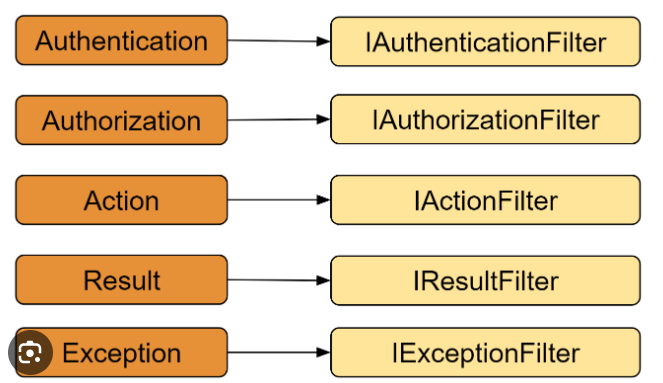
11. MVC filter

 After MVC 5 Authentication filter is also available


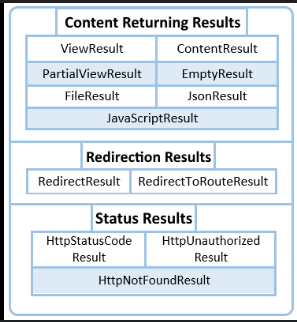
12. Action Results


13. Tempdata - Peek Vs Keep


  • Not Read
  • Normal Read
  • Read and Keep
  • Peek and Read

14. As Vs Is

  • IS keyword is helpful to check if the object is that type or not.
  • AS keyword is helpful too if we want to convert one type to another type.
  • IS keyword type is boolean and AS keyword is not a boolean type.
  • The operator returns true if the given object is of the same type whereas as operator returns the object when they are compatible with the given type.

15. Extenstion Methods

16. Overloading (Compile-Time) Vs Overrding(Run-Time)


17.Generic Collections(Array, IDictory,List ,IList)

Generic is a type to be specified later. They are instantiated when needed for a specific type provided as parameters. In other words, a Generic allows you to write a class or method that can work with any data type(System.Collection.Generic namespace)


18. Icollections Vs IEnumerable


19. DI Life Time and DI in .NET core

20. CORS

21. React Hook

22. React Life Cycle

23. Thirdparty React - Router, Redux , Axios

24. SQL Optimization (Exection Plan tab check ,etc.)

25. Handle Error 

      .NET using log4net Vs .NET Core Serilogger

26. Struc Vs Class


Monday, 30 September 2024

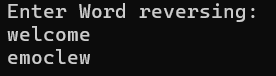
Word reversing without any build in features in C#

 Console.WriteLine("Enter Word reversing: ");

string s1=Console.ReadLine();

string s2= string.Empty; 

for (int i = s1.Length -1; i > -1; i--)

{

    s2 += s1[i].ToString();

}

Console.WriteLine(s2);

OUTPUT


Checking of string contains word contains on another string

 Console.WriteLine("Enter First word: ");

string s1 = Console.ReadLine();

Console.WriteLine("Enter Second word: ");

string s2 = Console.ReadLine();

int j = 0;

for (int i = 0; i < s2.Length; i++)

{

    s1.Contains(s1[i]);

    j++;

}


string s3 = j == s1.Length ? "Word in First word is also present  in the second" : "Word in First word is not present  in the second";


Console.WriteLine(s3);


Sunday, 7 April 2024

SQL Deadlock

Types of Deadlock

exclusive lock(X), shared lock(S), update lock (U), intent lock (I), schema lock (SCH) and bulk update lock (BU)

select * from sys.dm_tran_locks

 The first time a user sees the following message, the result of an unhandled deadlock error in SQL Server, it can come as quite a shock.

Msg 1205, Level 13, State 56, Line 10

Transaction (Process ID 62) was deadlocked on lock resources with another process and has been chosen as the deadlock victim. Rerun the transaction.

Two or more sessions were waiting to acquire a lock on a resource already locked by another session in the same locking chain. The result is a 'circular chain' where no session can complete, and so SQL Server is forced to intervene to clear up the mess. It automatically chooses one of the sessions as the 'victim', kills it and rolls back its transaction. It means that the other sessions may proceed, but that is little comfort to the hapless victim, and if that victim happens to be a session running a critical business process, then it may soon be of little comfort to the DBA.

Deadlock monitoring Two Type of methods

Deadlock Fixing

Redux in react

 React Redux 8.x requires React 16.8.3 or later / React Native 0.59 or later, in order to make use of React Hooks.

React Redux includes a <Provider /> component, which makes the Redux store available to the rest of your app:

import React from 'react'

import ReactDOM from 'react-dom/client'

import { Provider } from 'react-redux'

import store from './store'

import App from './App'

// As of React 18

const root = ReactDOM.createRoot(document.getElementById('root'))

root.render(

  <Provider store={store}>

    <App />

  </Provider>,

)


useSelector reads a value from the store state and subscribes to updates, while useDispatch returns the store's dispatch method to let you dispatch actions.

import React from 'react'

import { useSelector, useDispatch } from 'react-redux'

import {

  decrement,

  increment,

  incrementByAmount,

  incrementAsync,

  selectCount,

} from './counterSlice'

import styles from './Counter.module.css'


export function Counter() {

  const count = useSelector(selectCount)

  const dispatch = useDispatch()


  return (

    <div>

      <div className={styles.row}>

        <button

          className={styles.button}

          aria-label="Increment value"

          onClick={() => dispatch(increment())}

        >

          +

        </button>

        <span className={styles.value}>{count}</span>

        <button

          className={styles.button}

          aria-label="Decrement value"

          onClick={() => dispatch(decrement())}

        >

          -

        </button>

      </div>

      {/* omit additional rendering output here */}

    </div>

  )

}

Redux Toolkit